 |
BCGControlBar Pro for MFC
|
|
BCGControlBar Pro for MFC
|
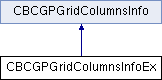
The CBCGPGridColumnsInfoEx class extends the functionality of the CBCGPGridColumnsInfo class to allow creation of custom header layout.
To create a custom layout you have to perform the following steps:
Example 1:
Example 2:
 Inheritance diagram for CBCGPGridColumnsInfoEx:
Public Member Functions | ||
| AddHeaderItem | Adds a new header item for the layout. | |
| GetHeaderLineByPoint | Retrieves the header line by point. | |
| GetHeaderLineCount | Returns the number of header lines. | |
| GetHeaderTooltip | Returns header tooltip. | |
| RemoveAllHeaderItems | Removes all header items and restores the default header layout. | |
| SetHeaderLineCount | Sets header line count. | |
| Public Member Functions inherited from CBCGPGridColumnsInfo | ||
| EnableCheckBox | Enables or disables the grid column check box. | |
| EnableScaledInZoomedGrid | Specifies whether grid columns should be automatically resized when the grid is zoomed in/zoomed out. | |
| GetCheckBoxState | Retrieves the column check state. | |
| GetColumnImage | Returns the zero-based index of the image, associated with the specified column. | |
| GetColumnWidthAutoSize | Tells whether a column has fixed, or automatic size. | |
| HitTestColumn | Call this method to obtain information about a column from the given point. | |
| InsertColumns | Inserts several columns into the grid control. | |
| IsCheckBoxEnabled | Tells whether a grid column check box is enabled or not. | |
| IsScaledInZoomedGrid | Tells whether grid columns should be automatically resized when the grid is zoomed in/zoomed out. | |
| Resize | Recalculates the width of columns to fit the working area of the grid control. | |
| SetCheckBoxState | Sets a column check state. | |
| SetColumnImage | Associates the column with image from the header's image list. | |
| SetColumnWidthAutoSize | Enables or disables automatic size for a column. | |
| SetHeaderMultiLine | Sets a column header to multiline mode. | |